
Plan smarter.
Wrap calmer.
Five modules. Smart automation that gives you hours back. Free view access for the whole crew on PC, tablet, and mobile.
30 days free · no card required · whole crew views free
Prep doesn't
have to be
like this.
Most scheduling disasters aren't dramatic. They're small things missed when everyone's tired.
One workspace.
Five modules.
SceneItAll brings script management, breakdown, scheduling, element tracking, and reports into a single platform. Smart automation does the busywork - first-pass breakdown, conflict detection, call sheet drafts, sides. You stay in control of every final call. Available on PC, tablet, and mobile from day one - the whole crew sees the current version on their phone, free of charge.
Five modules.
Nothing re-typed.
Change anything upstream and the downstream documents update themselves. No re-typing, no version chaos.
Script management that cleans itself up
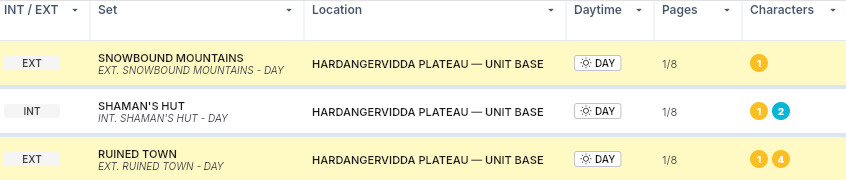
Upload .fdx, .fadein, or .fountain. Edit scene headings directly. Run continuity scan to flag every INT/EXT mismatch, daytime inconsistency, or set discrepancy before you publish the breakdown.
Breakdown drafted in about a minute
Smart breakdown does the first pass - synopsis, elements, scene splits, key tags. You review, edit, and customise the categories. Locked by default so nobody changes your prep by accident. One click to unlock.
Scheduling that flags problems before set does
Traditional stripboard scheduling, plus conflict detection on meal penalties, working hours, turnarounds, and child actor hours. Sunset and sunrise auto-calculated per location and date. Different scenarios, unit schedules, side-by-side comparisons.
Cast, crew, and everything else in one place
Cast list with sizing, availabilities, agent contacts. Crew list with contacts and availabilities. Mark element availabilities - picture vehicle, animal, hero prop, location restriction - and the schedule respects them automatically.
Call sheets and sides in seconds
Call sheets drafted from the schedule automatically, with cast prep times calculated to your settings. Sides by shoot day, character, or location, with photos if you want them. Daily production reports, extras breakdown, DooD - all drafted from the schedule. You adjust; the app fills the data.
Production schedule and personal task list, one place
No second notebook. Schedule fittings, production meetings, BTS days, PR interviews, and travel directly in the app. Events scheduled during shooting flow into the call sheet draft. Personal task list lives here too.
Why teams switch.
Smart automation. You stay in control.
First-pass breakdown, prep timing, call sheet drafts, continuity scan - the platform does the heavy first draft, you review and confirm. Nothing changes without a click. The breakdown is locked by default.
Errors caught in prep, not on set.
Meal penalties, child actor hour breaches, turnaround violations, sunset and sunrise mismatches, missing elements, broken continuity - we flag all of it in the background. Mistakes that used to surface on the shoot day surface during prep, where they cost a few minutes instead of a budget overrun.
One source of truth, on any device.
Cast and element availabilities feed the schedule. The schedule feeds the call sheet. The call sheet pushes to the crew's phones. No re-typing, no version chaos, no printed PDFs going stale by lunch.
Made by people who run sets.
Led by a working 2nd AD and PM. The defaults are right because the person setting them has actually run prep. The vocabulary in the product matches the vocabulary on set. The shortcuts match how the work flows.
Find your seat
on the call sheet.
Hours back in your prep.
A real schedule built fast, a call sheet that drafts itself, sides on demand. Conflict warnings before you end up on set with a child actor sliding into overtime. The voice of someone who's stood at video village with a walkie - in the copy, in the defaults, in the shortcuts.
Stop re-typing the same data.
Cast availability changes once and reflects everywhere. The next day's distribution list generates from yesterday's call sheet. Five apps collapse into one. The “I don't have to do that part anymore” moment, on every prep day.
One license. Errors caught before they cost.
One subscription covers the production. View access free for the whole crew. One meal penalty caught in prep pays for the year. One child actor hour violation flagged before set saves five figures. The software cost is dwarfed by the first error it prevents.
Use your own Claude on your project data.
The MCP connector lets you bring your personal AI account into SceneItAll. Your choice of model, your privacy boundary, your call. No extra charge, no credits used. We don't push our AI on you - we give you the option to use the one you already trust.
Claude subscription
One plan per production. Add seats as you need them.
From €25$30 a month - one editor, two projects, 30-day free trial, no card. Three plans plus custom, every module included, with free view-only access for the whole crew. Education is free for film schools.
Your scripts
stay yours.
Personal Claude access via MCP keeps your AI use under your own account, not ours.
The questions you'd ask.
Try it on your
next prep.
30 days, no card required. Cancel anytime. Free view access for the whole crew is included.